Discord Reaction Bots
How to get Order ID
You must have purchased Discord Members before purchasing reactions.⚠️
After Purchasing Members, you will get an email with the title:
"AUTOBOTS PURCHASE OAUTH-ACW0627U41-32O3BN"
OAUTH-ACW0627U41-32O3BN is your Order ID
How to get Reaction Message Link
We recommend using chrome to get the reaction link.
Click
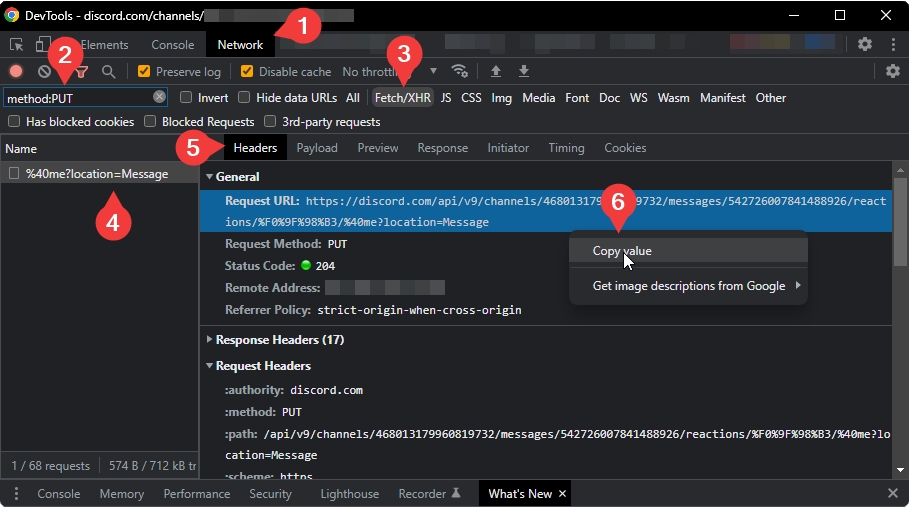
F12orCtrl + Shift + Ito open the DevToolsNavigate to the
NetworktabEnter
method:PUTin Filter and selectFetch/XHRGo back to Discord and react the emoji you want on the message
Now you should see a new row show up in
Networktab with name%40me?location=Messageor%40meClick on it and Copy the
Request URLDone. that's it!
 Example link:
Free
Bitcoin
Pay with Bitcoin or swap from other crypto
Ethereum
Pay with ETH or swap from other crypto
Litecoin
Pay with LTC or swap from other crypto
BNB
Pay with BNB or swap from other crypto
USDT ERC20
Pay with USDT ERC20 or swap from other crypto
USDC ERC20
Pay with USDC ERC20 or swap from other crypto
USDT BEP20
Pay with USDT BSC or swap from other crypto